See the hidden details
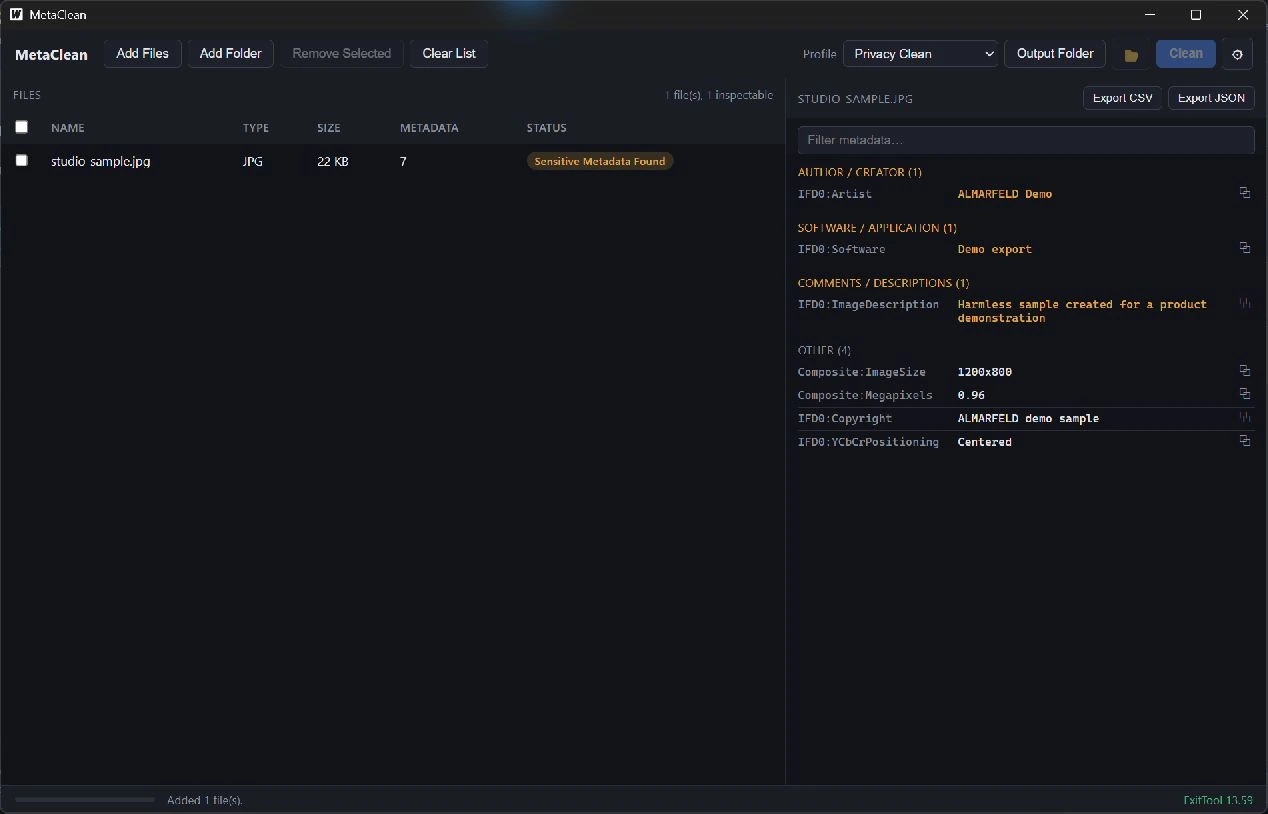
Inspect metadata by category, with sensitive fields highlighted. Search values and copy them for review.
MetaClean
Inspect hidden file metadata before sharing: location, author names, camera details and software information. Choose a cleaning profile for supported images and PDFs, save a sanitized copy, and check what remains. The bundled ExifTool engine does the work locally.
WHAT IT DOES
MetaClean keeps the workflow focused, from the first input to a result you can review.
Inspect metadata by category, with sensitive fields highlighted. Search values and copy them for review.
Use Privacy Clean, Remove All Metadata or Custom categories on supported formats. Process files in a batch queue.
Re-scan cleaned files to see remaining metadata. Export CSV metadata reports or JSON privacy reports.
LOCAL BY DESIGN
Files and metadata are processed locally. Cleaning creates a separate copy by default. Optional original replacement requires confirmation and a backup; there are no accounts, uploads or runtime network calls.