Evidence-based scanning
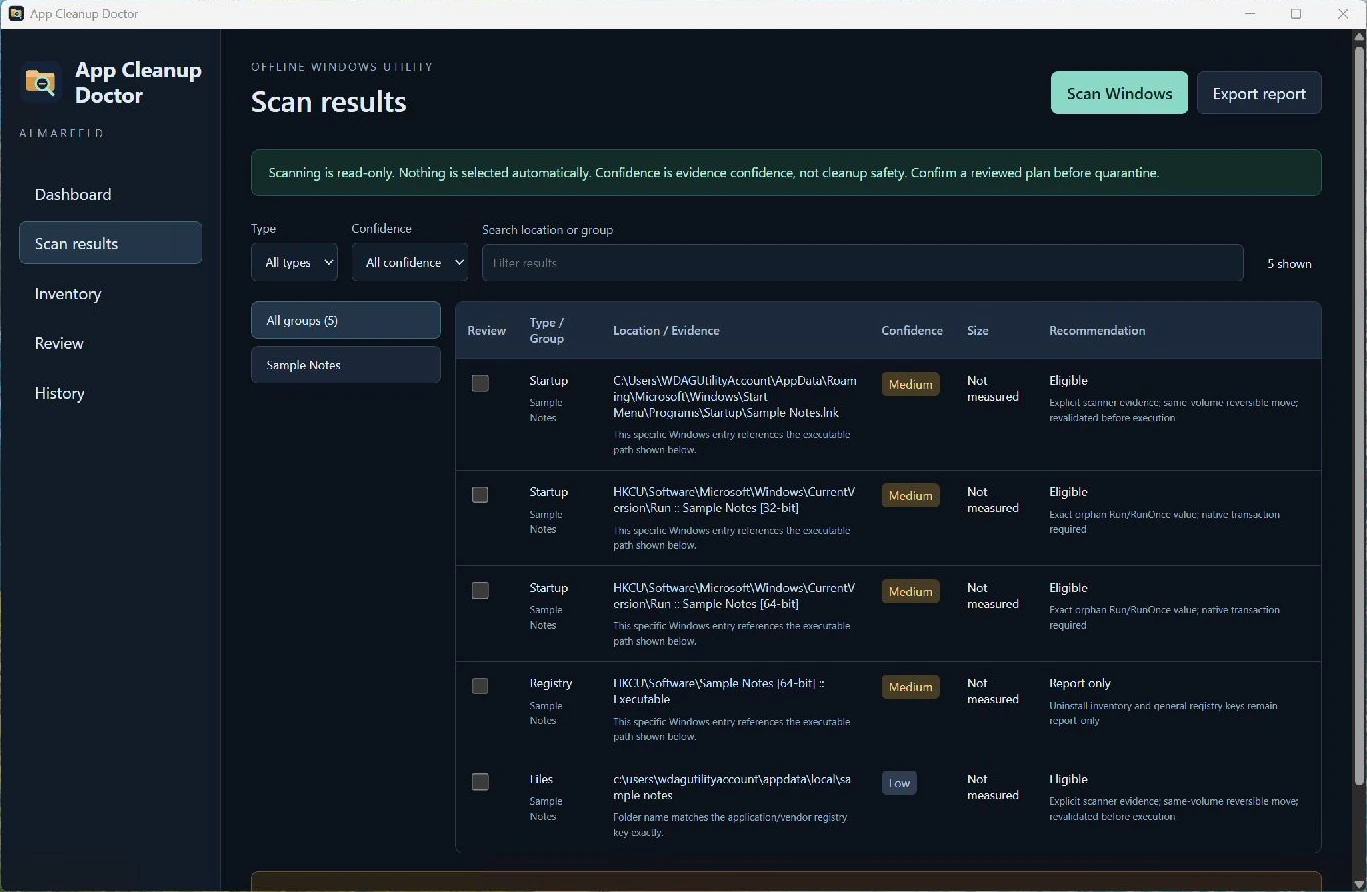
Correlate missing executable references with application traces. Inspect exact locations and evidence; confidence means evidence confidence, not removal safety.
Find evidence-based leftovers from uninstalled Windows applications, review them manually and move supported items to reversible quarantine.
Requires Microsoft Edge WebView2 Runtime.
Extract the whole ZIP into a folder and run AppCleanupDoctor.exe. Keep adjacent packaged files and folders together.
Microsoft Edge WebView2 Runtime is required separately. Install it from Microsoft if missing; it is not bundled or installed automatically by the app.
Windows binaries are not Authenticode signed, so Windows may show a reputation or security warning. Download only through official ALMARFELD or GitHub release links. Do not disable Windows security.
For an optional SHA-256 check, open PowerShell in the folder containing your downloaded ZIP and run:
Get-FileHash -Algorithm SHA256 .\AppCleanupDoctor-v1.0.0-win-x64.zipExpected SHA-256:f075e3166b05142043c67b5ba14915aa393dceb09da98a3f98b500723360e30a
Compare the Hash value; letter case does not matter. A matching hash confirms the downloaded bytes match the published artifact; it is not a malware scan or an Authenticode signature. Do not run a file with a different hash.
Correlate missing executable references with application traces. Inspect exact locations and evidence; confidence means evidence confidence, not removal safety.
Nothing is selected automatically. Manually select eligible items and review a frozen cleanup plan before confirming any change.
Move supported files and folders to same-volume local quarantine. Restore without overwriting replacements; locks, permissions and conflicts can prevent restoration.
Services, scheduled tasks, uninstall inventory and general registry keys remain report-only. Ambiguous or unsupported cases are withheld.
Quarantine eligible orphan Startup shortcuts and back up eligible orphan Run/RunOnce values with exact registry type and data.
Reload quarantine history after restart. Incomplete operations require recovery review rather than automatic cleanup continuation.
Scanning and cleanup happen locally. No accounts, telemetry, analytics, uploads, cloud processing, automatic updates or runtime downloads. Quarantine and operation journals remain on your machine. No separate .NET installation is required.
Not a generic registry cleaner or a guarantee that every finding is safe to remove. Nothing is preselected; services, tasks, uninstall inventory and general registry keys remain report-only. Permanent deletion, quarantine purge/expiry and automatic cleanup are unavailable. Restore is not guaranteed. Microsoft Edge WebView2 Runtime is required separately; the executable is not Authenticode signed. Portable ZIP: 4,450,643 bytes.
Support and bug reports →Extract the ZIP and run the application.
The release includes a SHA-256 checksum file.
AppCleanupDoctor-v1.0.0-win-x64.zip
SHA-256: f075e3166b05142043c67b5ba14915aa393dceb09da98a3f98b500723360e30a
ALMARFELD software is free to use. If these tools save you time, you can support continued development.
Helpful bug reports and feedback also make a difference. Get in touch →