Detect and diagnose
Detect delimiters and UTF-8, UTF-8 BOM, UTF-16 or Windows-1252 encoding where supported. Review detection choices; ambiguous parsing requires an explicit decision.
Diagnose problematic CSV, TSV and delimited text files, review repairs and export a separate copy.
Requires Microsoft Edge WebView2 Runtime.
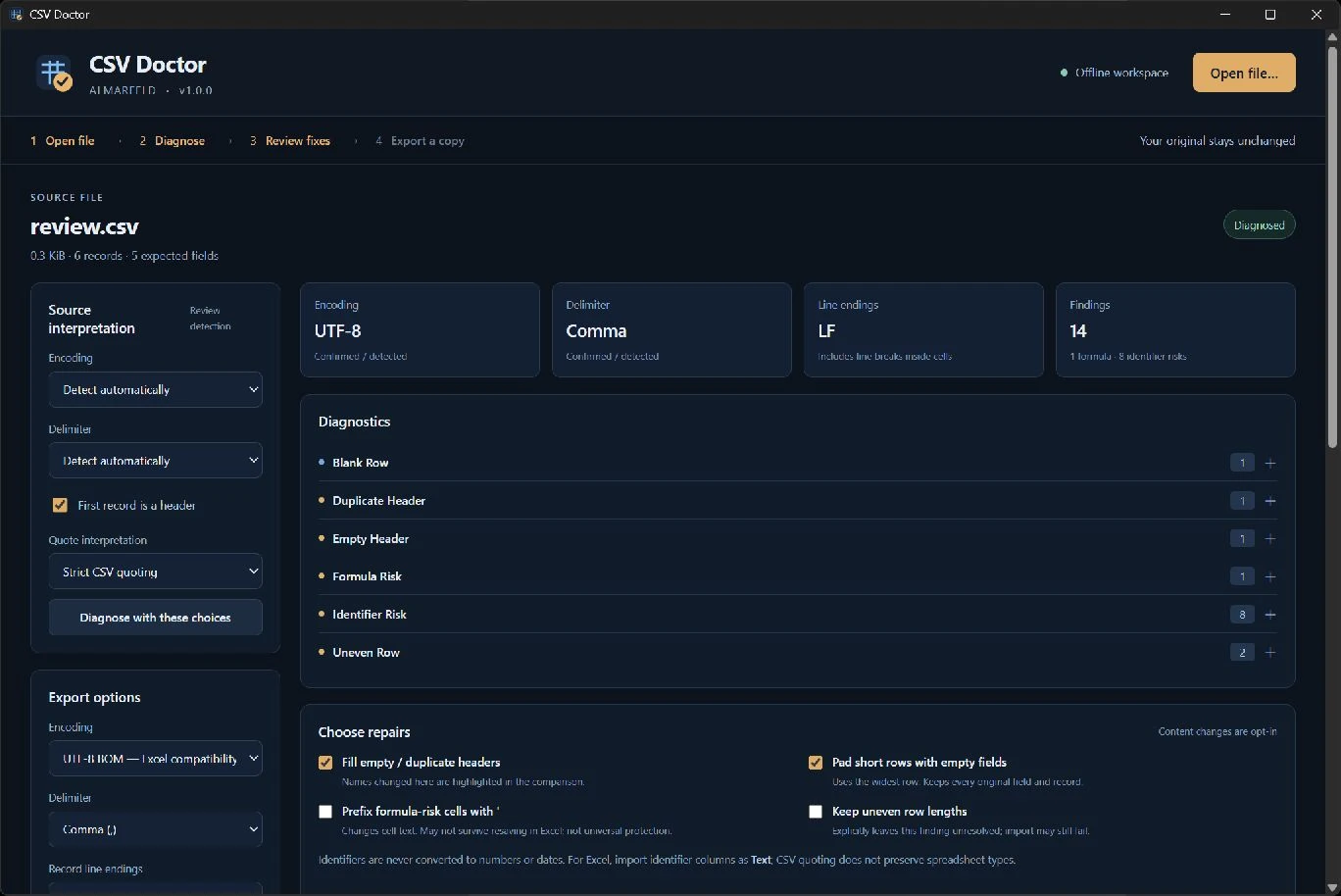
Extract the whole ZIP into a folder and run CSVDoctor.exe. Keep adjacent packaged files and folders together.
Microsoft Edge WebView2 Runtime is required separately. Install it from Microsoft if missing; it is not bundled or installed automatically by the app.
Windows binaries are not Authenticode signed, so Windows may show a reputation or security warning. Download only through official ALMARFELD or GitHub release links. Do not disable Windows security.
For an optional SHA-256 check, open PowerShell in the folder containing your downloaded ZIP and run:
Get-FileHash -Algorithm SHA256 .\CSVDoctor-v1.0.0-win-x64.zipExpected SHA-256:bba87c59320c96d0015afdf20435a09229baf9f03a9be5319f7b7152eb45bf29
Compare the Hash value; letter case does not matter. A matching hash confirms the downloaded bytes match the published artifact; it is not a malware scan or an Authenticode signature. Do not run a file with a different hash.
CSV · TSV · Delimited TXT · Comma / semicolon / tab / pipe
Detect delimiters and UTF-8, UTF-8 BOM, UTF-16 or Windows-1252 encoding where supported. Review detection choices; ambiguous parsing requires an explicit decision.
Find inconsistent column counts, malformed or ambiguous quoting, blank rows, empty headers and duplicate headers. See the source in a table preview.
Identify potential formula-risk cells and leading-zero or long numeric identifiers. Identifiers remain text; optional formula-risk prefixing changes cell text only when explicitly selected.
Compare source and proposed output, with changed cells highlighted and each selected fix explained. Rows and columns are never silently removed.
Choose UTF-8 or UTF-8 BOM, comma, semicolon, tab or pipe, and CRLF or LF record endings. Save a separate file and a small JSON report of findings and applied changes.
Files are processed entirely offline. No telemetry, uploads, accounts or automatic downloads. Export creates a new copy and an adjacent JSON repair report; originals are not modified and existing destination files are refused.
Input limits: 16 MiB, 100,000 records and 256 columns. Failed or ambiguous parsing blocks export until resolved explicitly. CSV files cannot prevent Excel itself from reinterpreting values after import; import identifier columns as Text. Formula-risk protection is optional and not universal. Microsoft Edge WebView2 Runtime is required separately, not bundled or installed automatically.
Support and bug reports →Extract the ZIP and run the application.
The release includes a SHA-256 checksum file.
CSVDoctor-v1.0.0-win-x64.zip
SHA-256: bba87c59320c96d0015afdf20435a09229baf9f03a9be5319f7b7152eb45bf29
ALMARFELD software is free to use. If these tools save you time, you can support continued development.
Helpful bug reports and feedback also make a difference. Get in touch →