Five output languages
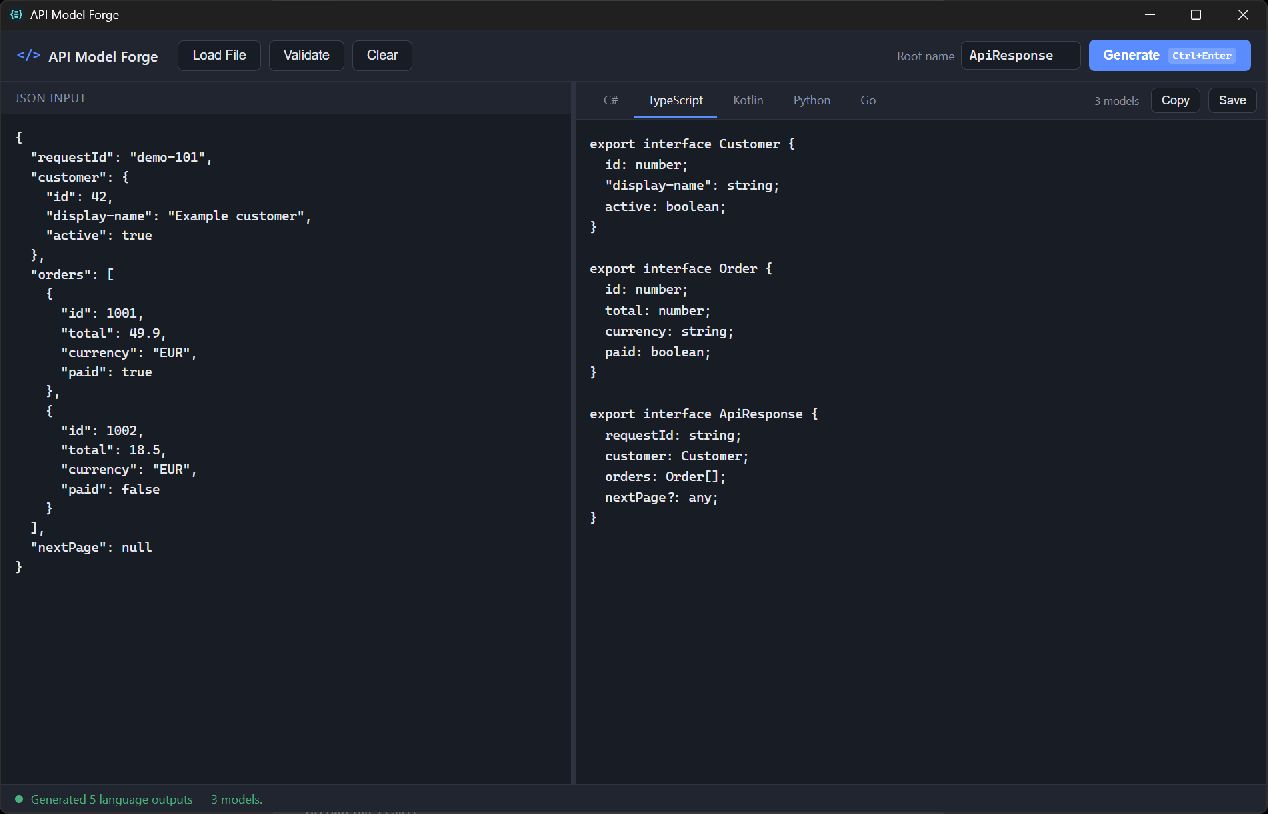
Generate C# classes, TypeScript interfaces, Kotlin data classes, Python dataclasses and Go structs.
Paste JSON and generate typed models for C#, TypeScript, Kotlin, Python or Go.
Related guide: How to Generate Typed Models from JSON Without Sending API Data Online
Requires Microsoft Edge WebView2 Runtime.
Extract the whole ZIP into a folder and run APIModelForge.exe. Keep adjacent packaged files and folders together.
Microsoft Edge WebView2 Runtime is required separately. Install it from Microsoft if missing; it is not bundled or installed automatically by the app.
Windows binaries are not Authenticode signed, so Windows may show a reputation or security warning. Download only through official ALMARFELD or GitHub release links. Do not disable Windows security.
For an optional SHA-256 check, open PowerShell in the folder containing your downloaded ZIP and run:
Get-FileHash -Algorithm SHA256 .\APIModelForge-v1.0.1-win-x64.zipExpected SHA-256:3ca7d6163d6b6c56966ab3589e058952841e2bbf8379d6ce3c82187d567304d5
Compare the Hash value; letter case does not matter. A matching hash confirms the downloaded bytes match the published artifact; it is not a malware scan or an Authenticode signature. Do not run a file with a different hash.
Turn a JSON object or saved API response into typed models for C#, TypeScript, Kotlin, Python and Go. One shared type tree handles nested objects, arrays and nullable values. Name the root, review the output, then copy or save the generated code.
Generate C# classes, TypeScript interfaces, Kotlin data classes, Python dataclasses and Go structs.
Handle nested data, mixed object shapes and nullable fields. Strict validation rejects trailing content and duplicate keys before generation.
Resolve normalized-name collisions and reserved words, escape unusual JSON keys, and avoid Kotlin JVM getter conflicts.
Choose a root type name, switch language tabs, then copy the result or save a generated file.
Paste JSON or load a local file. Generation happens entirely on your machine, without network calls, accounts or telemetry. The app does not fetch API responses for you.
Generated models are a starting point for your project. Review inferred types and nullability against your API contract. Renamed Kotlin and Python fields need serializer name mapping. Microsoft Edge WebView2 Runtime is required separately; it is not bundled or installed automatically.
Support and bug reports →Extract the ZIP and run the application.
The release includes a SHA-256 checksum file.
APIModelForge-v1.0.1-win-x64.zip
SHA-256: 3ca7d6163d6b6c56966ab3589e058952841e2bbf8379d6ce3c82187d567304d5
ALMARFELD software is free to use. If these tools save you time, you can support continued development.
Helpful bug reports and feedback also make a difference. Get in touch →