Complete certificate details
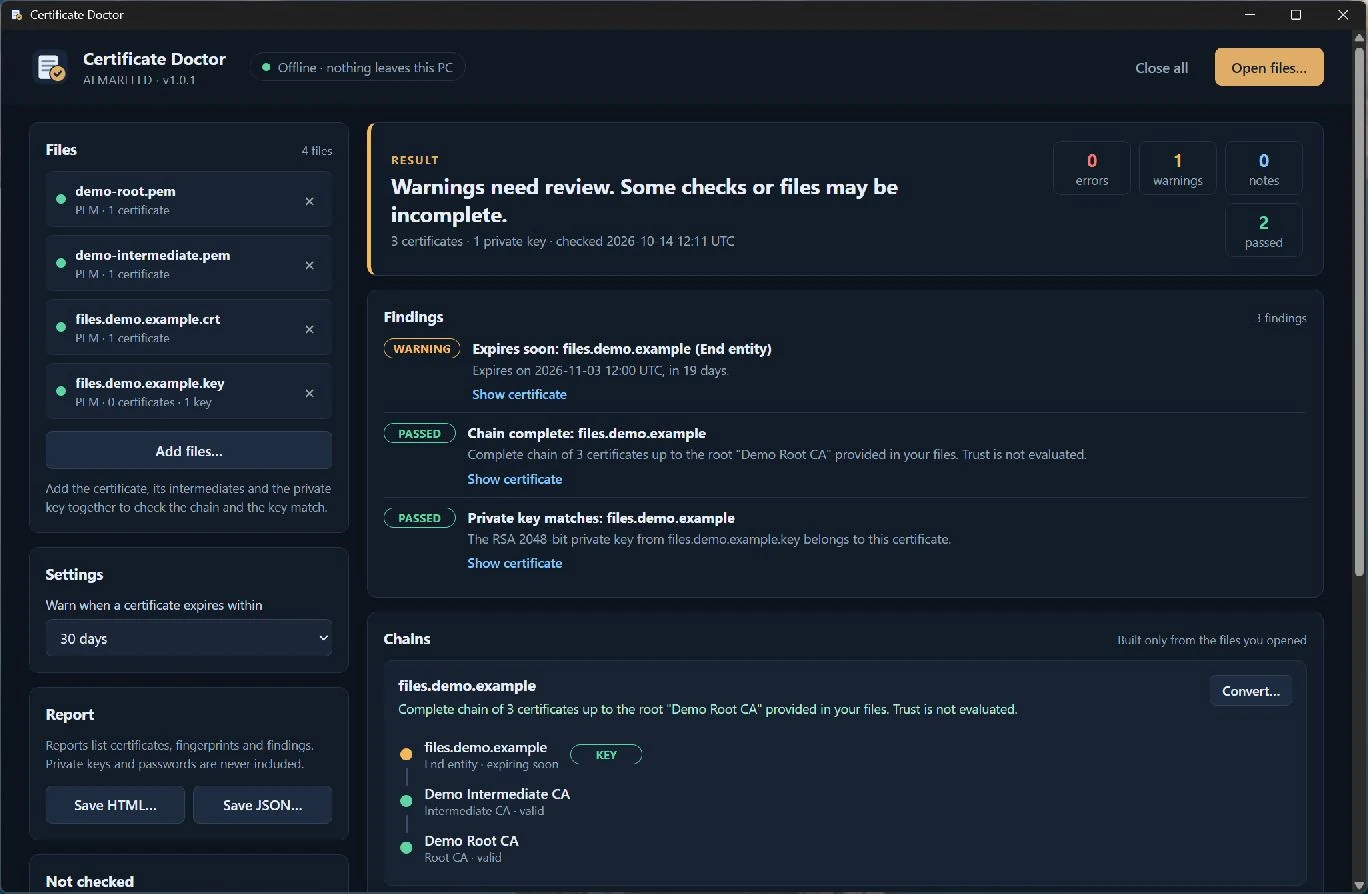
Subject, issuer, validity and days remaining, Subject Alternative Names, key algorithm and size, signature algorithm, key usages, serial number and copyable SHA-1/SHA-256 fingerprints.
Inspect certificate files, find a missing intermediate or a private key that does not match, and convert a copy between PEM, DER, P7B and PFX without uploading anything.
Requires Microsoft Edge WebView2 Runtime.
Extract the whole ZIP into a folder and run CertificateDoctor.exe. Keep adjacent packaged files and folders together.
Microsoft Edge WebView2 Runtime is required separately. Install it from Microsoft if missing; it is not bundled or installed automatically by the app.
Windows binaries are not Authenticode signed, so Windows may show a reputation or security warning. Download only through official ALMARFELD or GitHub release links. Do not disable Windows security.
For an optional SHA-256 check, open PowerShell in the folder containing your downloaded ZIP and run:
Get-FileHash -Algorithm SHA256 .\CertificateDoctor-v1.0.1-win-x64.zipExpected SHA-256:685c356d882b7eef47d58dec57461da433ba5368d4fee31d172fe5b5f74e5341
Compare the Hash value; letter case does not matter. A matching hash confirms the downloaded bytes match the published artifact; it is not a malware scan or an Authenticode signature. Do not run a file with a different hash.
.cer / .crt / .der (DER or PEM) · .pem (certificates, PKCS#7 and unencrypted keys) · .key (unencrypted PKCS#8, PKCS#1 or EC keys) · .pfx / .p12 (PKCS#12, password protected or not) · .p7b / .p7c (PKCS#7 bundles)
Subject, issuer, validity and days remaining, Subject Alternative Names, key algorithm and size, signature algorithm, key usages, serial number and copyable SHA-1/SHA-256 fingerprints.
Build chains from the files you open. See missing intermediates, absent roots and invalid signatures; unsupported signatures are reported as unverified rather than accepted.
Flag expired, not-yet-valid and soon-to-expire certificates with a 7–90 day threshold, RSA keys under 2048 bits and SHA-1/MD5 signatures.
Check whether a .key, .pem or PFX private key belongs to a certificate. Key material is never displayed.
Save a PEM chain, DER certificate, P7B chain, PFX with a new password (AES-256), PEM chain with key or the key alone. Unencrypted key outputs show a warning first.
Save a self-contained report with certificates, fingerprints, chains and findings, including files that could not be inspected. Reports never contain private keys or passwords.
Everything happens locally. No network access, accounts, telemetry, analytics, uploads or automatic updates. PFX passwords are used in memory only and are never stored, logged or included in reports. Private keys are written to disk only when you explicitly choose a conversion that includes a key. Original files are never modified, and existing files are never overwritten.
Certificate Doctor does not check revocation (no OCSP or CRL), does not download missing certificates (no AIA), does not evaluate trust against the Windows certificate store and does not validate hostnames. It does not generate CSRs, sign, or edit certificates or keys, and it cannot decrypt encrypted PEM keys. A complete chain means the provided certificates link correctly, not that a client will trust them. Microsoft Edge WebView2 Runtime is required separately; the executable is not Authenticode signed. Portable ZIP: 4,553,575 bytes.
Support and bug reports →Extract the ZIP and run the application.
The release includes a SHA-256 checksum file.
CertificateDoctor-v1.0.1-win-x64.zip
SHA-256: 685c356d882b7eef47d58dec57461da433ba5368d4fee31d172fe5b5f74e5341
ALMARFELD software is free to use. If these tools save you time, you can support continued development.
Helpful bug reports and feedback also make a difference. Get in touch →