Inspect every signer
Check each cryptographic signature and inspect its certificate, issuer, algorithms, dates and signing-time assertion.
Open. Verify. Extract. Understand P7S files.
A free and open-source Windows utility for opening P7S containers, extracting their original content, verifying cryptographic signatures and inspecting signer certificates — locally on your PC.
Self-contained .NET 10. PDF preview alone needs Microsoft Edge WebView2 Runtime. Windows executables and the installer are not Authenticode signed.
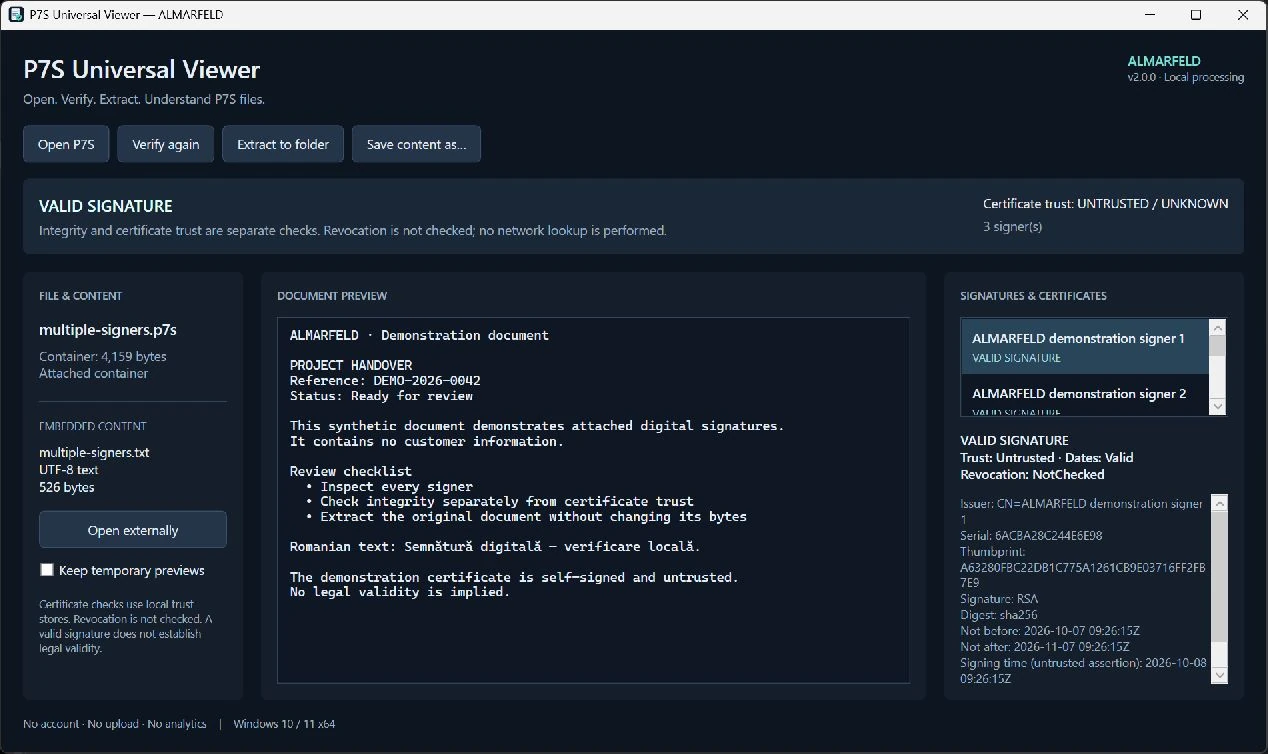
Run the installer, or extract the portable ZIP and run P7SUniversalViewer.exe. These binaries are not Authenticode signed, so Windows may show a reputation or security warning. Download only from the official GitHub release or this product page. Do not disable Windows security.
For an optional SHA-256 check, open PowerShell in your download folder and run the command for your file:
Get-FileHash -Algorithm SHA256 .\P7SViewer_Setup-v2.0.0.exeExpected installer hash:c13490b2493658e378828bb9d3526adf1ae2525b058364de2822d40306e69d53
Get-FileHash -Algorithm SHA256 .\P7SUniversalViewer-v2.0.0-win-x64.zipExpected portable ZIP hash:78567c82f020215c623a07847098ec94f9cc418acfc64b4542fb1badffcbcac7
Compare the Hash value; letter case does not matter. A matching hash confirms the published bytes, not malware safety or Authenticode signing. Do not run a file with a different hash.
Check each cryptographic signature and inspect its certificate, issuer, algorithms, dates and signing-time assertion.
Keep valid or invalid document signatures separate from certificate trust, current certificate dates and unchecked revocation.
Select the exact original file when the signed container does not include it. Different original bytes fail verification.
Save original bytes without modifying them. Existing files are never silently overwritten. Preview PDF, UTF-8 text, PNG, JPEG and GIF where supported.
Every signer has one checked result shared by the status header, list and detail panel. Signature integrity tells you whether the signed bytes match. Certificate chain trust, current validity dates and revocation are separate questions.
Certificate checks use the Windows trust store locally. Revocation is not checked. A signing-time assertion is not a trusted timestamp; timestamp authority tokens are identified but not validated. Cryptographic success does not establish legal validity.
An attached container includes its original content. A detached P7S file contains a signature separately: select the exact original file to verify it. A different original file produces an invalid result.
How to open a P7S file on Windows →Save or extract the embedded document without changing its bytes. Filenames are sanitized, output paths are checked, and existing files are never silently overwritten. PDF, UTF-8 text, PNG, JPEG and GIF can be previewed. Other content remains extractable without pretending to render unsupported formats.
Archives and Office containers are not decompressed. Input is limited to 64 MiB and content to 48 MiB, with bounded ASN.1 structure and signer counts.
Screenshots use synthetic documents and demonstration certificates.
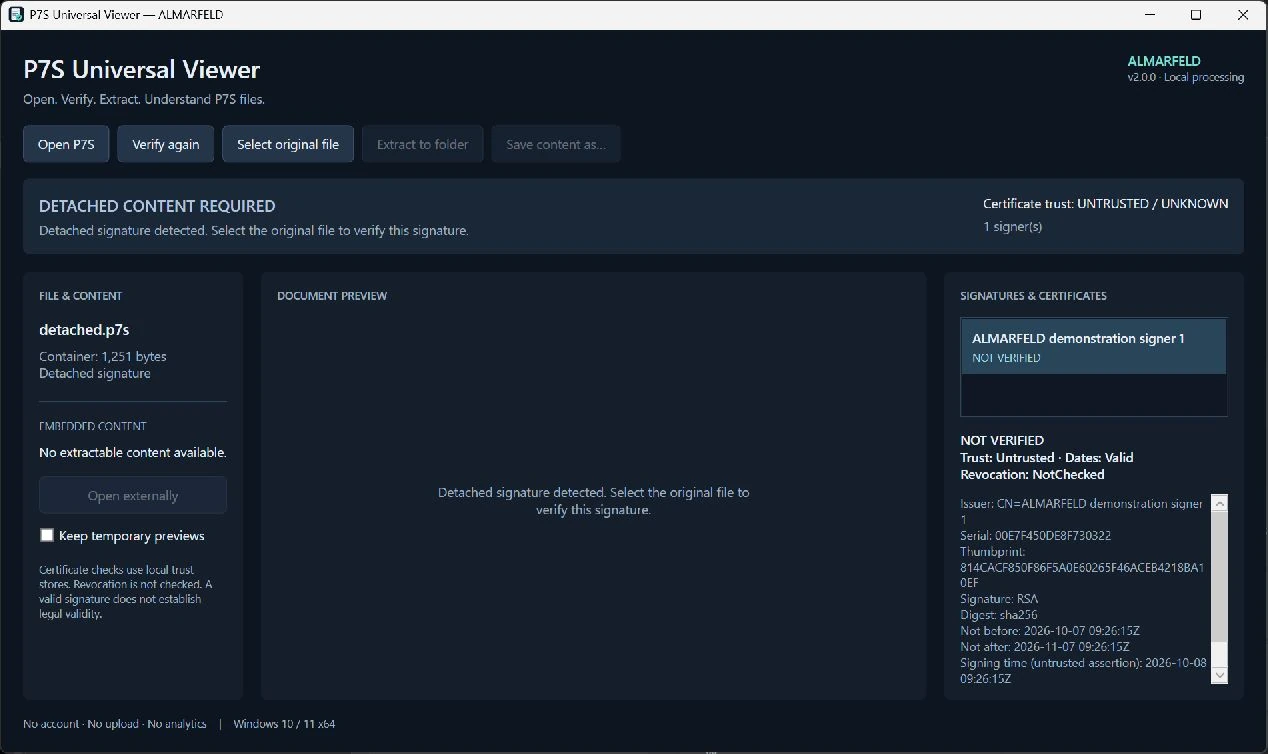
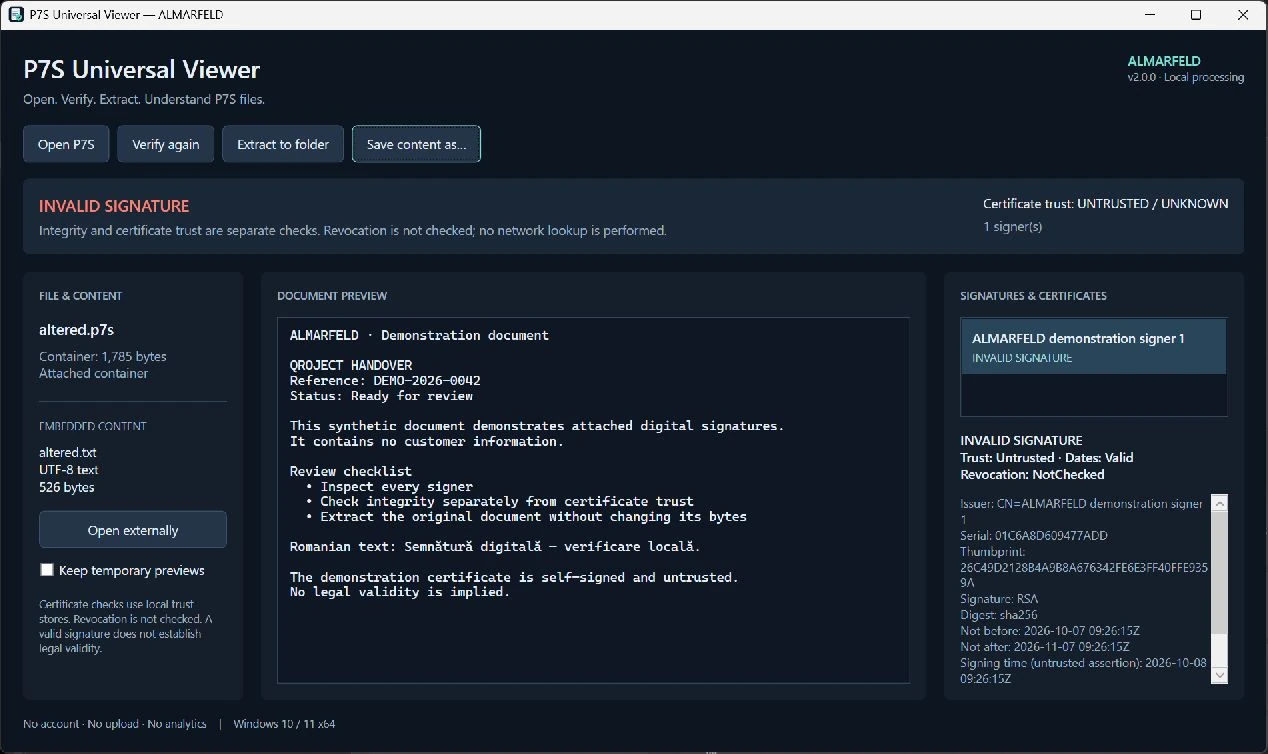
Files are processed locally and are not uploaded to ALMARFELD servers. Certificate downloads and revocation network checks are disabled. Opening extracted content in another application is your choice; that application may use the network.
Cryptographic integrity is not legal validation or a document-safety guarantee. Revocation and timestamp authority verification are not performed. Archives and Office containers are not decompressed. Windows binaries are not Authenticode signed.
Temporary previews use random owned sessions under the user profile, with cleanup on document changes and exit. The explicit Keep temporary previews option retains them.
Security reporting →V2.0.0 is available. Choose the installer for a Start Menu shortcut, or extract the portable ZIP into a folder and run the application.
P7SViewer_Setup-v2.0.0.exe
Installer SHA-256: c13490b2493658e378828bb9d3526adf1ae2525b058364de2822d40306e69d53
P7SUniversalViewer-v2.0.0-win-x64.zip
Portable SHA-256: 78567c82f020215c623a07847098ec94f9cc418acfc64b4542fb1badffcbcac7
Windows executables and the installer are not Authenticode signed. The signed release tag and SHA-256 checksums do not replace an Authenticode signature.
The original v1.0.0 installer remains unchanged. Its signature-list indicator has a known false-Valid defect; do not use it as verification evidence.