How to Open a P7S File on Windows
A P7S file is a signature container, not necessarily a document you can open in a PDF reader.
What a P7S file contains
P7S commonly uses CMS / PKCS#7 SignedData. It includes cryptographic signatures and signer certificate information. With an attached signature, it also includes the original document. With a detached signature, the original content is a separate file.
Open the container
P7S Universal Viewer v2.0.0 is available for Windows. Download the installer or portable ZIP from the product page; see first-run and download verification instructions before launching. The examples below use synthetic data.
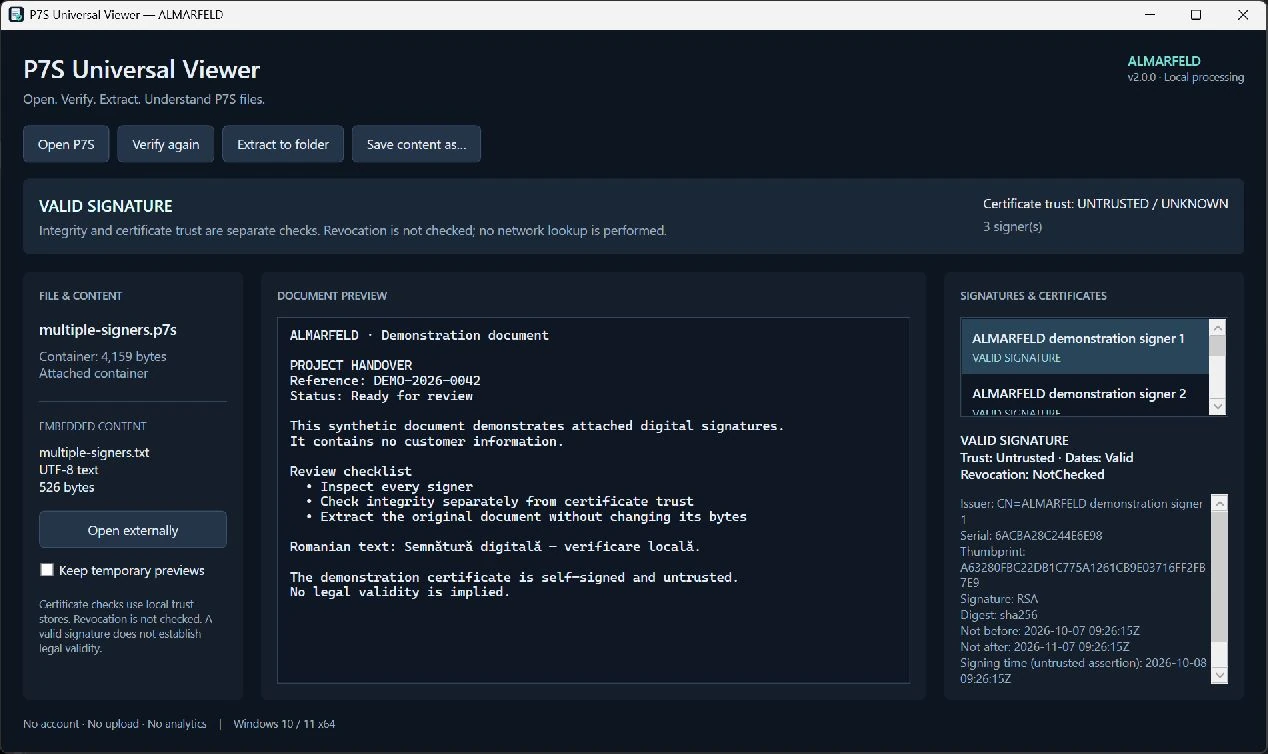
- Open P7S Universal Viewer and choose Open P7S, or drop one P7S file onto its window.
- For a detached signature, choose Select original file and locate the exact original document. A resaved or modified copy may not have the same bytes.
- Inspect the result header and select each signer to see certificate details.
- Use the preview for supported text, PDF or images. PDF preview needs the separate Microsoft Edge WebView2 Runtime.
Extract the original content
Choose Extract to folder or Save content as…. The application detects the content type from its bytes and writes the original bytes unchanged. Choose a new filename if a file already exists; nothing is silently overwritten.
A detached signature does not contain a document to recover. You must already have the original file. Changing a P7S extension to PDF does not extract its contents.
Integrity is different from certificate trust
A valid cryptographic signature means the verified document bytes match the signature. It does not, by itself, mean the certificate is trusted, still within its validity period, or not revoked. Nor does it determine legal validity.
V2.0.0 uses local certificate trust stores with certificate downloads disabled. Revocation is not checked. Signing-time assertions and unverified timestamp tokens are not proof of a trusted signing time. Synthetic self-signed certificates can have valid integrity while remaining untrusted.
Common problems
- Detached content required
- Select the exact original file, not a converted or resaved copy.
- Invalid signature
- The signed bytes or signature may have changed, or the original detached file may be wrong. Do not treat this as successful verification.
- Untrusted certificate
- The local trust store cannot establish the certificate chain. This is separate from whether document integrity passes.
- No preview
- The content may be unsupported, exceed preview limits, or require WebView2 for PDF. Extraction remains available when content exists.
Privacy and limits
Documents are processed locally, without ALMARFELD uploads or analytics. Preview HTTP/HTTPS document requests are blocked. Opening an extracted file in another application may involve that application's network behavior.
Keep the original signed container and document. Extraction does not sanitize malware or remove sensitive information. Never share a private signed document merely to demonstrate an error; use a synthetic example for bug reports.
Download P7S Universal Viewer and check requirements →